Cognition Comments Considered Harmful
I was looking forward to writing a post this weekend about Happy Cog’s new commenting system on their otherwise excellent new blog, but the sage minds at Full Stop interactive beat me to it. You should read Nate’s whole post. It’s spot-on.
It’s interesting to me that Happy Cog is trying to eliminate the negative things associated with commenting by encouraging brevity, while for several years, the secret sauce I’ve cooked up to prevent comment spam has involved just the opposite: measuring the amount of time you spend typing and only entering your comment into the database if you spend more than a few seconds on it. It works like a charm and eliminates 99.9% of comment spam before it even gets in the front door.
In my opinion, what Happy Cog has created is useful. Let’s just not confuse it with a commenting system for a blog.
It doesn’t encourage community, it doesn’t encourage conversation, and for the most part, it’s not accretive in any way. What it does do is create a lot of linkbacks to your blog on Twitter. Is this valuable? Sure. But is it as valuable as free-flowing, insightful, conversations which elevate ordinary posts into conversation pieces?
Not for me it’s not.
For all the great things about Twitter — and there are many — one of the worst things about it is that it’s making us lazy ambassadors of our thoughts. Why spend an hour on a blog post when we can tweet out our main thesis in ten seconds? Why allow conversations on our blogs when we can just hear the first 140 characters of our readers’ opinions?
We know short attention spans are bad for our intellectual development. We should be creating solutions that fight against this threat… not feed into it.
Another Nail in the Pageview Coffin
This weekend, msnbc.com launched a sweeping redesign of the most important part of their site: the story page. The result is something unlike anything any other major news site is offering and is a bold step in a direction no competitor has gone down (yet): the elimination of pageviews as a primary metric.
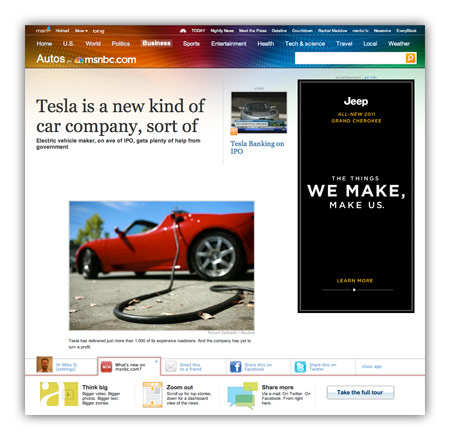
For many years, I’ve railed against tricks like pagination and “jump pages” as a means to goose pageviews. Honest people in the industry will tell you these are simply acceptable tricks to bump revenue a bit, while disingenuous or uninformed people will use “readability” as an excuse to make users click ten times to read ten parts of a single story. For this latest redesign, msnbc.com has decided to de-emphasize page views entirely and present stories in a manner that maximizes enjoyment and as a result, total time on site.
What do I mean by this?
Think of how a typical user session works on most news sites these days. A user loads an article (1 pageview), pops open a slideshow (1 pageview), flips through 30 slides of an HTML-based slideshow (30 pageviews). That’s 32 pageviews and a lot of extraneous downloading and page refreshing.
On new msnbc.com story pages, the above sequence would register one pageview: the initial one. The rest of the interactions occur within the page itself. Can msnbc.com serve ad impressions against in-page interactions? Sure, and that’s key to the strategy, but as a user, your experience is much smoother, and as an advertiser, the impressions you purchase are almost guaranteed to come across human eyes since your ads are only loaded upon user interaction.
This is the first time (to my knowledge) this sort of model has been deployed on a major media site with over a billion pageviews a month, and it has the potential to change the entire industry if it works. It’s also a big risk, as most advertisers are not used to thinking of inventory this way. We like big risks with big payoffs though and we feel that when you take care of the user and the advertiser at the same time, you’re probably onto something.
Ad model aside, there are also tons of other interesting things about the new msnbc.com story pages:
- Every form of storytelling (text, video, audio, slideshows, discussion, voting, and more) is now available right within each story page itself.
- The top navigation (nicknamed “the upscroll”) contains all basic elements when a page loads but if you scroll the page upward past its initial position, you get more interesting stories to read. It’s a great way of presenting a content-packed header without sacrificing screen real estate.
- A social bar at the bottom of the screen, powered by Newsvine, which lets you easier share content via Newsvine, Facebook, Twitter, and other services.
- An “annotated scrollbar” down the right side of the screen capable of teleporting you to any section of the page you desire.
- Bigger, easier to read text. Goodbye Arial, once and for all!
To be clear, the msnbc.com team is very proud of what’s been launched so far, but is under no illusions that things are perfect yet. Everyone involved in creating these new story pages is monitoring reaction closely and ready to modify anything that needs improvement. Since we have plenty of thoughtful design and development voices here on Mike Industries, I’d love to open this thread up for some reactions. What is working for you, and what, if anything, would you change? The team is listening.
A good problem to have
Through much of the late 90s and early 00s, I remember having the same conversation over and over again about Apple and Microsoft. I had it with my friends, I had it with my colleagues, and I had it with anyone else who was interested in computers. It went something like this:
Other person: “When are you going to give up already and start using a PC? The war is over. Apple lost.”
Me: “They still make the best stuff and I want to support the company that makes the best stuff; not a company that uses their monopoly to sell products.”
Other person: “Don’t you think Apple would do the same thing if they were in charge?”
Me: “Yes. They’d probably be even more ruthless, but at least they’d make great products.”
From there, the conversation would tail off in another direction but I always remember thinking wishfully to myself that if Apple ever did rule the world again, what a fantastic problem it would be. Instead of having our future dictated to us by a company who didn’t even care enough to fix a broken web browser for over five years, we’d have our future dictated to us by a company who produced the most wonderful products in the world. The dream seemed so far-fetched, however, that it was easy to miss the potential for nightmare in it.
Trading places
Apple will probably finish this year a larger company than Microsoft, from a market capitalization perspective. That would mean the world values the sum of future cashflows into Apple more than any company in the United States besides Exxon-Mobil. God forbid the terrible BP oil disaster gets worse and has cascading effects on other oil companies, we could see Apple at #1.
So in a sense, we’ve now admitted — as investors at least — that Apple owns our wallets, many years into the future. This actually feels good right now, though, in a way. Not only am I using a great operating system, but lots of other people are too. Not only do I have a phone that keeps me connected, but I really enjoy using it too. Not only can I craft richly designed web experiences for geeks with good browsers but a good majority of people can finally view them too.
Most things are great so far. The reward we’ve reaped as a society for shoving greenbacks into Apple’s bank account for the last decade is that we have much better stuff now. It’s the exact opposite effect we got from making Microsoft big.
Those who are following the situation, however, have noticed a few things change recently, the most obvious being a move towards an incredibly closed operating system in iPhones and iPads. Many believe it’s only a matter of time before most of Apple’s products run on a similar OS. There are many definitions of “closed” vs. “open” but here is mine:
- A closed system is one where a single organization has absolute control of everything that goes into it and everything that comes out of it.
Adobe ignores fire, gets burned
Steve Jobs wrote in his mostly reasonable letter condemning Flash that it was Adobe whose stuff was closed and Apple was the one using open technologies, but Adobe’s CEO — despite saying very little of substance — was right about one thing: this is a smokescreen. In order to use the Flash format, all I need to do is either buy a single copy of it (if the IDE is useful to me), or use any number of other, free compilers out there. In other words, Adobe never even needs to know about me and never needs to approve what I’m doing or selling.
In order to get my stuff onto an iPad or iPhone, however, I must receive explicit approval by a human being working for Apple after this human being has manually reviewed my work, derived my intentions for the product, and made a value judgement on what my creation brings to the device. As long as that process exists, there shall be no arguments that the iPhone or iPad are more open than just about anything we’ve ever seen before… including Flash. To claim that because Apple is pushing open standards like HTML5 (really for their own benefit) means they are somehow more open than Adobe is folly.
Adobe’s problem in this mess is that they’ve painted themselves into a corner with the public. They used to be loved by everyone who used their products. Ask a designer ten years ago whether they’d rather switch away from Apple or switch away from Adobe and I’m sure most would have stuck with Adobe. Today, not only has the situation reversed itself, but I find myself actively trying to move away from Adobe on my own. They’ve shipped nothing but bloatware for the past five years, each version of CS being slower and buggier than the previous and offering very little important utility in return. $700-$1000 for Photoshop CS5 and it still can’t even print a tiled document. Adobe Creative Suite, in many ways, has become the Microsoft Office for the creative design and development industry. Somehow I bet that was a company goal in a presentation at some point. Mission accomplished. So when Apple stiffarms Adobe by changing section 3.3.1 of their iPhone OS developer agreement, it’s no wonder people aren’t exactly rushing to Adobe’s defense.
Flash has taken a slightly different path towards public distaste and I actually don’t blame Adobe for most of it. When Flash first came out, only the most talented design visionaries used it. When a new Flash site came out in 1999, each one was like a new DaVinci… beautiful works of art that moved the web from a tame, ugly typographically poor medium to a center stage for creativity.
Then the advertisers got ahold of it.
When most people speak ill of Flash, they are actually speaking ill of ads. Watching Flash video on YouTube doesn’t crash your browser; visiting a news site with five annoying Flash ads all trying to synchronize with each other does.
What most of these people don’t realize, though, is that it’s other “open” technologies that play a part in making this happen and will continue to, long after Flash is history. The OBJECT tag which spawns Flash movies is an open standard. The javascript that popped open that window with the screaming Flash ad is an open standard. And the HTML/CSS that slowly sashayed that 300×250 div right the fuck over that paragraph you were trying to read is an open standard too.
When Flash is gone, this overly aggressive marketing will simply be foisted upon you using more “open” technologies like HTML5. And guess what? It’ll be harder to block because it looks more like content than Flash does.
Here is when I digress just a little bit…
It also amuses me when people talk about two things in particular with regard to the iPhone and iPad. First, how much better some companies’ iPhone apps are than their web sites, as if the company is somehow so much more gifted at creating iPhone apps than web pages. It feels better because it’s designed for you to do things quickly. Most web sites are actually not designed for speed of task completion at all. They are designed to maximize page views or at the very least, time on site (and hence, maximize revenue). ESPN.com doesn’t want you reading one story about the Mayweather/Mosley fight and then moving on with your day. They want you to read ten more stories after that, check your fantasy teams, and buy a Seahawks jersey. Mobile.espn.com, on the other hand, is more concerned with getting you in and out quickly because they know you have less tolerance for distraction and extraneous clicks when you’re on your phone. The second thing is when people talk about how great content looks in some of these iPad apps. Again, this is a reaction to the lack of distraction, not the tablet form factor.
Content that is free of distractions and potential crashes looks and feels better. Period. It’s not the hardware; it’s the environment.
… and then try boldly to pull it back in
… which brings us back to Apple and their role in the way we experience information moving forward.
With the iPhone and the iPad, Apple has either smartly or stupidly drawn a line in the sand and declared themselves no longer just the arbiters of hardware and system UI but arbiters of content and commerce as well. If you want to develop or produce content for Apple’s ecosystem, you will do exactly as Apple tells you to do. If you want to enjoy Apple’s products as a consumer, you’ll enjoy every freedom Apple provides and live with every limitation they impose. It’s like a country club. Apple isn’t saying you can’t play golf with your pit-stained t-shirt and denim cutoffs. They’re just saying you can’t do it at their club. Apple wants to run the most profitable country club in the world, with millions of members, but they don’t want everybody; and therein lies the difference between how their resurgence is playing out and how Microsoft’s dominance ultimately played out.
Microsoft wanted 100% share in every market they entered. The thought was that once you dominate a market, you can impose your will on it via pricing, distribution, bundling, and all sorts of other methods designed to maximize profit. To Microsoft in the 1980s, a monopoly was a great problem to aspire to have, and since antitrust laws weren’t routinely applied to software companies, the threat seemed immaterial. The problem with this thinking, however, was that the law eventually caught up to them and crippled their ability to continue operating as a monopoly.
Apple, on the other hand — while in danger of eventually suffering the same fate — seems determined to avoid it. What’s the best way to avoid becoming a monopoly? Make sure you never get close to 100% market share. What’s the best way to temper your market share? Keep prices a bit higher than you could. Keep supply a bit lower than you could. Keep investing in high margin differentiation and not low margin ubiquity. Remember how Microsoft invested $150 million in Apple in 1997 in order to keep them around as a plausible “OS alternative” in hopes of avoiding the antitrust knife? Well Apple already has that in Android, in Blackberry, in Windows Mobile, in Palm, and in Nokia. They are fighting hard right now to make sure they are one of the two or three that will continue to be relevant in 5-10 years, but their goal is clearly not to be at 100% or even 90%. That level of success would get the company trustbusted.
It is this prescient and necessarily restrained motivation that reveals the true reason why Apple has closed up tighter over the last few years: it’s not to take control of the world. It’s specifically to separate themselves from a pack of companies they need as their competitors but want relegated to the lower margin areas of the market. Apple will stay closed as long as being closed is a net positive to their business. Until people either start abandoning their products because of this or the do the opposite and adopt their products at a rate which creates a monopoly, they will continue operating at their current clip: high innovation, high profits, and high control.
It’s scary to people because they remember the harm other companies have done when they reached monopoly status, but with Google, Microsoft, Nokia, RIMM, and now HP all keeping the market healthy with different alternatives, there is no excuse for not voting with your feet if you’re unhappy. Apple’s not going to take over the world because — if for no other reason — the laws of the United States won’t let them. If you don’t want to contribute to their success because their behavior is distasteful to you, then don’t; but don’t forget how fortunate we are to have such a ruthlessly innovative company at the helm of the ship at this point in time. Either get on it or just pick another boat and draft in its wake. When the biggest problem in personal technology is that the leading company is getting a little too exceptional, it’s a good problem to have.
It’s Only a Matter of When
I’ve been trying to square my lack of enthusiasm about the iPad with the seemingly very positive analyses from those smarter than me.
After a few days, I think I finally reconciled it with a simple realization: the only reason I’m not enthusiastic about the iPad as a consumer is that it simply falls below my value curve at this point in time. Consider the graph below:
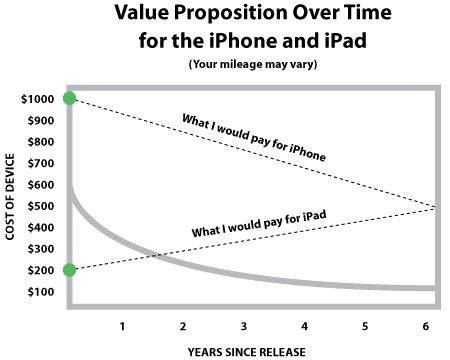
When the iPhone came out, I would have paid $1000 for it. I still would, to be honest. I wouldn’t exactly be happy about it, but I’d do it. It provides so much utility to me, it’s become such an indispensable part of my life, and it has no perfect substitutes, so its price elasticity to me is extremely low. Apple can charge pretty much whatever it wants and I will buy exactly one iPhone.
When the iPad was announced, however, the value curve was very different for me. It is currently a device I’d pay about $199 for. Not $499-$829. That is not to denigrate it at all. It just means its current value to me is below its current price. I don’t read eBooks, I have a laptop for my mobile computing needs, and I don’t have a place in my workflow for this device at this point in time.
The key is what happens over time, however.
The first effect is a pricing effect. As the price of both devices inevitably decreases, the value equation begins to change. A $10,000 iPad sells maybe 1000 units. A $1000 iPad sells maybe a million units. A $100 iPad sells 50 million units. And a $10 iPad sells about 500 million units.
So then, “liking” the iPad is really just a question of “what price would you pay for it?” For me, it’s about $199 right now. Electronic toy price, in other words. For others it may be a lot higher, and still others, lower.
The second effect is a utility effect. The utility of an iPhone is very high right now. It already plugs into existing cellular and wifi networks, it fits in your pocket, it replaces multiple devices, and it has few competitors. What happens when it’s not the only horse in the race though? We’re already starting to see stiff competition from Google with the Nexus One and Nokia undoubtedly wants to play this game too. It’s unclear whether any competitors will succeed making a better smartphone than Apple, but they will certainly create viable substitutes, thus reducing the unique utility of the device.
Look at what happens (possibly) with the iPad though. You can just sense by looking at it that it’s a bit “early”. There isn’t enough to do with it yet. The New York Times app looks nice and all, but it’s a far cry from a world of widely available, richly laid out e-publications (I personally question, however, if we even need this sort of world). You also can’t use the iPad for home automation stuff yet (although my buddy Danny will be working on it). You can’t beam Hulu from it to your TV. You can’t video conference with it. You can’t control it with voice commands. You can’t run it for a week on a single charge. These are all things I think we’ll see in the next several years, and thus it may become a more valuable device as time goes on.
When either the price is lowered to my value threshold, or my value threshold rises due to increased utility, that is when a purchase will be made. Perhaps even multiple purchases.
There is little doubt in my mind — upon finally thinking this through from a dispassionately microeconomic standpoint — that at least one of these two things will happen; and that is why Apple wins in the end, despite our best attempts to be curmudgeonly about it.
Slate of Hand
Well, it’s January, and as has become commonplace over the last several years, the public is abuzz with anticipation over a new Apple device. This time it’s a tablet.
I think the single most interesting thing about this unannounced tablet is how pumped everyone is about it, despite its lack of obvious value proposition. When we get new Mac models, we get lighter, faster, and prettier machines. When we got the iPod, we got a whole new paradigm for consuming music. And of course, when we got the iPhone, we got the ability to replace multiple devices with a single, all-in-one device that did everything much, much better.
With this tablet thing, however, I feel like I’m much more skeptical than the press, the fanboys, and everyone else who thinks it’s such a slam dunk to change the world. It’s like the greatness of the iPhone has everyone thinking Apple is somehow going to top that level of revolution with each new market they enter. There has always been a magical quality to the company’s development and introduction of products under Steve Jobs, but I wonder if expectations are a bit too high at this particular point in time.
In my opinion, even if the Apple tablet succeeds, I can’t see how it will have nearly as much impact as the iPhone, the iPod, or the Mac; and if it fails, it will be end-of-lifed or morphed into something else within a few years. I don’t think it will replace the laptop and I don’t think it will totally re-invent anything we currently do on our computers. Whereas the multi-touch interface enabled us to do things we’d never dreamed of doing on pocket devices before, I’m not sure it will do the same for bigger screens.
This, from a guy who sleeps in rose-colored Apple-shaped glasses.
In trying to square my lack of enthusiasm with what I’ve been reading about this thing, I keep coming back to the question: what’s it for?
First of all, I think this device is almost entirely for consumption, and not production. It will be borderline unusable for writing essays, designing posters, making movies, and even sending emails. When you want to produce something, you will not do it with this tablet.
With consumption and severely limited production as the premise, what sorts of things could you do with this device? I see four possibilities that could be construed as compelling:
- Television tethering
- E-publication reading
- Portable video viewing
- Video chat
Television tethering
This is probably the only thing on the list that would singlehandedly cause me to purchase an Apple tablet. I haven’t heard anyone talk about it, but this is how it would go: the tablet comes with a dongle that can connect via RCA/component/HDMI to any television. The tablet communicates wirelessly with the dongle to both send video to it via 801.11N (or whatever shiny, new, faster wireless interface is next) and also to control the TV watching experience. In this scenario, you could use it to relay things like live Hulu streams to your TV or display stored video you bought from iTunes or “borrowed” from somewhere else.
There is also a chance this could be done in concert with Apple TV instead of a dongle, but the clear problem it solves for me is “how can I easily display on television the video that is currently playing on my computer?” Right now, the answer to that is to carry my laptop over to my TV, plug it into an extra input, pop the video player full screen (if I even can), and then walk back over to the laptop every time I need to control something. It’s the critical link that is keeping Hulu and similar services from being a much bigger part of my life.
My feeling is that Apple TV has never done as well as Apple hoped, but also that it is not something the company is going to give up on anytime soon. Part of me wonders if the tablet, among other things, is just a much better form to stuff Apple TV functionality into. If it is, I’m probably in.
Almost everyone who has a Kindle loves the hell out of it. I probably would have bought one awhile ago, but I just don’t read enough books to justify it. Aaron Swartz, on the other hand, with his 132 book per year reading pace, could probably justify owning three (sidenote: WTF Aaron!) (sidenote #2, WTFFFFF JOE!!!). If the Apple tablet did e-books plus a few other things in this list, however, I might be a buyer.
To me, the biggest clue that Steve Jobs cares about this market is that he says he doesn’t. Jobs famously said a few years ago, in response to a question about entering the e-book reader market:
“It doesn’t matter how good or bad the product is, the fact is that people don’t read anymore.”
Not only is that statement preposterous, but it flies in the face of the positioning Apple tries to bestow on its products: that they are for intelligent consumers. Guess what is strongly associated with intelligence? Reading. Particularly books. What Jobs really meant by his statement was:
“People are reading fewer and fewer books because they are less convenient than other types of media.”
The first statement is terse, dismissive, and meant to throw the press off Apple’s scent. The second statement is what you will probably hear at the launch event.
Another clear clue that e-publication reading is a large part of the Apple tablet is the flub by Bill Keller of the New York Times a few months ago. Keller’s unauthorized reference to the tablet all but guarantees they have a deal with Apple to display New York Times content on this device. It could be something very simple and uncompelling like a Times Reader app that is offered for free, but what if it’s something more substantial like the New York Times actually subsidizing the tablet if you sign up for a two year subscription to the e-NYT? I’m actually less interested in what the New York Times (and other) content looks like on the tablet and more intrigued by what the economics behind this sort of content delivery look like.
Another question I have about this tablet — if it’s going to compete with the Kindle — is what its equivalent of E Ink is. The Kindle enjoys a whopping one week battery life largely because it doesn’t require a backlight to operate. Currently, all of Apple’s screens are backlit, and unless the company has an answer to that, it may have problems competing head-to-head with the Kindle on pure e-book reading. Or has Apple invented a way to overlay an E Ink screen on the same surface as an LCD screen? That would be ridiculously awesome.
Portable video viewing
There aren’t a whole lot of really great solutions out there for watching video on the go. An iPhone is too small for most people, while a laptop is probably overkill. A tablet with 15-20 hours of battery life and the ability to stand up like an easel might fit the bill perfectly for viewing on a bus, on a plane, in a car, or elsewhere on the go.
I don’t think this benefit alone would sell a lot of tablets, but it would help justify a purchase for some people.
Video chat
I’ve never been into video chat as I find it extremely awkward, but I understand it’s big in the grandparents’ set and every other set where people are potentially far away from loved ones. While I mentioned above that I don’t expect a lot of content production to be done on the tablet, live video capture and broadcast could be a notable exception because it requires you to do nothing but look into the tablet and speak.
A few thoughts on form factor
A lot of my skepticism around tablet computing stems from my belief that the form factor just isn’t as beneficial as it seems. Besides when sitting in a cramped airline seat, I don’t recall many situations in which I wished the bottom half of my laptop would disappear. When I have, it’s always been for high-volume consumption: long form video and long form text. In other words, things that don’t require me to do much of anything besides staring at the screen. Does a market exist for a device that does just these things and not much else? I think the Kindle has proved that at the right price point, the answer is yes. I guess I just don’t consider that as world-changing of a product as other people do. I guess we won’t know until we see it though, right?
As far as actual form-factor goes, I expect something significantly more klutz-proof than the iPhone. My guess is an all-aluminum body with an aluminum panel that covers the device’s screen when closed and folds open to double as an easel when you’re using the device on a flat surface. I expect a solid-state drive as the only storage option but would like to see an SD-card slot as well. 801.22N (or better) wireless is a given, but if this thing has 3G/4G connectivity, it’s not going to be through AT&T. If I had to bet one way or another, I would be on wifi only. If this device is successful, it’s another bargaining chip for Apple when it renews iPhone negotiations with carriers, and I don’t think this sort of connectivity would sell many more units right now.
So anyway, that’s all I have for now. I expect a device that will sell a decent amount of units but fall short of the world-changing expectations placed upon it by people who think Apple will never release another product that doesn’t top its previous one.
Idea: “Record This” Bookmarklet
Lately I’ve been intrigued by situations in which the amount of effort required to complete a task is not overwhelming but it is enough to prevent the task from getting done. The latest example, from a couple of weeks ago, was wine journaling. Sure it only takes a few minutes to pull out a laptop, log into your wine-dot-whatever account and structure a proper review, but unless a few minutes becomes a few seconds, I’m out… and so are thousands of other people.
Minertia is what I might call it… short for a “minimal level of inertia”.
Many companies have succeeded primarily because their products overcome minertia. Twitter is a good example of this. There were millions of people with (purportedly entertaining) thoughts, but none of these thoughts were worth spending more than 30 seconds to publish. Twitter provided a way to turn these idle thoughts into legitimate published communication with 30 seconds of effort, and BAM, they are the hottest company on the internet.
On to more pedestrian matters though: recording stuff on TV.
I’ll use Tivo as an example because that’s what I have, but this could apply to any DVR, Apple TV, Boxee, etc etc:
Here is how I decide to add a show to the repertoire of things my Tivo records automatically:
- Read about a new show somewhere online.
- Hear or read about it again somewhere else.
- Read about how good it is again and finally decide to do something about it.
- If I’m home, turn on the TV, navigate somewhat laboriously through on-screen menus and search for the show in order to set up automatic recording. If I’m away, go to Tivo.com and use their totally crappy search feature, try to find the program, and if that is even successful, set up automatic recording.
As you can see, this sometimes equates to several minutes of work (I’ve spent over 15 minutes trying to do this on my iPhone). Again, we’re not talking about a huge time investment here, but it’s enough to require steps 1-3 whereas with a little minertia reduction, people might be willing to record shows the first time they hear about them.
What got me thinking about this was an interview with Rex I read yesterday. In it, he mentions Modern Family as the best show on TV right now (I say it’s Dexter or Million Dollar Listing, but whatever). Thankfully, Rex’s interview was about the third time I’d heard this so I bucked up and did step 4. But here’s how much easier it could be:
- Read article on web which contains the name of a TV show.
- Click a bookmarklet to query Tivo, and Tivo spiders the page, highlighting all TV shows it recognizes.
- Click on the show you want, confirm with a little ajaxed-in dialog box, and a command gets sent to your Tivo to create a Season Pass for the show.
The effort would thusly be reduced to under 10 seconds.
As with the wine example, I fully expect someone to leave a comment pointing me to something that “kinda sorta” does this, but not in as optimal of a manner as I described above. Anybody know of something that does this? Or better yet, anyone work at Tivo and want to build this? :)
iPhone App Idea: WineSnap

Don’t let the beautiful bottle fool you… this is terrible wine.
If you’re an iPhone developer, you probably struggle a lot with the issue of effort vs. revenue. In other words, you think you’ve thought of something cool and you don’t mind investing the time to produce it, but you just aren’t sure if anyone will actually pay for it.
Here’s an app that — if well done — I would pay $20 or more for:
Whenever I’m having a glass of wine, allow me to snap a picture of the bottle (or the barcode from the bottle) and within 30 seconds enter some very basic information about it:
- Grade — A through F
- Characteristics — Mild, Strong, Oaky, Fruity
- Optional freeform text comments
Once I hit submit, save this to my wine library database, accessible via iPhone or web browser.
Are there other wine rating apps and services available right now? Definitely. But unfortunately none of them pass the 30 second test. They don’t even pass the 5 minute test. Usually when you’re in the middle of drinking wine — whether at a wedding, a party, at dinner, or in a dark alley — spending 5 minutes typing notes into your iPhone is just not something you’d ever consider doing… and this is the critical void that no one has filled yet.
It should be “snap, select, select, done”. By reducing the effort required to create a personal wine note library to this simple 30 second routine, you’d be enabling thousands of recreational wine drinkers to do something they’ve never been able to do before: actually remember what wines they try and which ones they like. That level of detail, in most cases, is all people really need, and it’s something I am 100% sure many would gladly pay for.
Ok then, who’s going to step up? I’ll be your first sale.
Mail > File to Task…
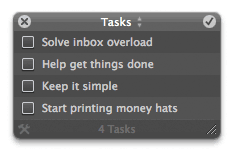 Perhaps this is already obvious to everyone else who has inbox overload, but I just figured out what I hate about e-mail and task management: they work against each other. Even if you’re the sort of person who diligently creates to-do lists in applications such as Anxiety or Things, any incoming email about your to-do items has nowhere useful to go. You currently have the following options:
- Leave it in your inbox until it’s done. I believe this is the most common and works decently if your load is low. It breaks down big-time when you have hundreds of e-mails on the same subject though and negatively affects your ability to deal with the rest of your inbox as a result. Even when you complete a task under this strategy, you often have to sift through your inbox and delete many e-mails afterwards.
- File it in either a simple or complex folder arrangement. This does not work well for many people, including me, because if something is not in our inbox, we tend to forget about it. Filing is for long-term storage, not easy recall.
- Make use of the “flagging” function in your email app, and flag each incoming message that requires action. This is mainly an improvement upon method 1, but it doesn’t solve a lot of problems.
I’ve given a bunch of different workflows a shot but nothing seems to have struck a chord yet. In popping open Anxiety today for the first time in about a year, I was reminded of how much I like its simplicity. It’s an automatically synching list of tasks and nothing more. You click to add a task and then when you complete it, you click its checkbox and it goes away forever. There’s no tagging, no dragging, and no nagging. It’s basically a half step more advanced than electronic Stickie notes… which I love.
That got me thinking, however, of how a nice simple app like this could play a role in finding the holy grail of time management: a simple solution that both declutters and organizes your information workflow, helps you get things done, and doesn’t require you to learn much or add administrative tasks to your routine.
I may eventually mock this up and screencast it or something but I’m too lazy right now so here it is in a nutshell:
- You receive an email from a co-worker telling you that you are on the hook to provide a mockup for a new product. It is due in a week.
- You click once in Anxiety (or a similar app, or some similar function in your Mail app) to create a task. You call it “Create mockup for Product X” and it instantly shows up in your task list.
- Every subsequent mail that comes in about this subject is either deleted by you if it’s trivial or “filed to this task”. Filing a message to a task removes it from your inbox and places it in some sort of mail folder that is linked to the task you created in Anxiety, Things, or whatever app. The key is how it gets there. Dragging messages in mail applications requires too much precision and mouse movement, in direct opposition to Fitts’ Law. Dragging 100 messages a day to different mail folders is incredibly onerous, especially if you have a ton of mail folders. Instead, inside each message would be a few buttons representing recent tasks you’ve filed messages to. There would also be some intelligence built-in based on subject lines and senders. With one click, you could file the message to any of your open tasks.
- You send off various mockups over the next few days and every time you need to refer to an email you sent or received about the project, you could simply click on the task in the task list and a (smart?) folder would open in your mail application showing you all messages filed against this task.
- You send off your final mockup and check off the task as “done”. The task is removed from your list and the folder full of messages tucks into an archive somewhere, out of sight and out of mind.
To me, this is the ideal workflow of an e-mail/task management system, and I haven’t seen anyone do it yet. Microsoft, of all companies, actually tried something along these lines with “Projects” in Entourage, but the interface got in the way. I’d love to see someone tackle it but with a keener eye towards simpler, more natural interaction. I almost wonder if the entire thing could be done with Mail.app and AppleScript.
Whoever finally solves the problem of inbox overload is going to make a lot of money. This would be a great first step.
Msnbc.com Acquires EveryBlock… Welcome Brother!
News that has been brewing secretly for the last several months finally broke this morning: Msnbc.com has acquired EveryBlock, the most interesting (in my opinion) startup in the hyperlocal news space. It is with great joy that I welcome my colleagues Adrian Holovaty, Wilson Miner, and the rest of the EveryBlock crew to the msnbc.com family to help re-imagine, re-invent, and re-volutionize local news online. You can read several other accounts and descriptions of the acquisition here (msnbc.com, New York Times, EveryBlock, Lost Remote) but I thought I’d provide some color from the standpoint of a founder whose company, Newsvine, was acquired almost two years ago by the same company.
First let me say that the acquisition of EveryBlock is an excellent fit for both companies. Msnbc.com’s focus has always been on national news, a concentration that has made them the most visited news site in the United States for over a year now; more than CNN, more than Yahoo News, and more than most local news sites combined. Leading the national news race is a great accomplishment to anchor your company around, but local news is where most of the disruption is occurring these days, and thus it is fertile ground for innovation. Local newspapers find themselves rich with great journalism, but crippled by legacy distribution and operational costs. Community news blogs enjoy tremendous grassroots energy but very little means to monetize their content. There are a million gusts swirling around in the local news tornado right now, and when the dust finally settles, the landscape will be much different than anyone could have imagined even five years ago.
The organizations that succeed in local news will be the ones who respect all of the great journalism and increasingly available data in cities and neighborhoods across the world while creating better ways for people to consume it. If you’re a organization in the local news space — big or small — and you’d like to be a partner in this future, we’d love to work with you.
Another reason I’m excited to welcome EveryBlock into the family is that I think it’s a great family to join if you’re an entrepreneur. When we signed on with msnbc.com almost two years, it was a leap of faith considering that other suitors would have provided different experiences. We knew msnbc.com was the closest to us geographically, so that part couldn’t have been matched, but you never know how you’ll be respected, used, or abused until you’re part of the family. When I read about incredibly smart and likable people like Joshua Schachter selling a great service like Del.icio.us to Yahoo, only to see Yahoo marginalize the product and send Josh fleeing the company like a burning building, it saddens me.
In addition to things going horribly wrong between acquirers and entrepreneurs, a perhaps even more common case is when entrepreneurs leave on good terms the day their contract period is up. For background, when you sell your company, you are usually required to stick around for some period of time until you receive all of the acquisition proceeds. This happens all the time, the most recent of which (that I can recall) being Dick Costolo at Feedburner. Dick’s a great guy, he sold a great service in Feedburner to Google, but he left more or less when his contract was over. There’s nothing wrong with this all… he made a truckload of money and probably wants to blow some of it on gold chains and petrified walrus testicles.
I think when you’re an acquirer though, your real hope is that the employees you are welcoming into the family *want* to work for you after they no longer have to… and that is the situation we find ourselves in right now.
Things, for the most part, are going swimmingly. Although building technologies and services for msnbc.com has slowed our development efforts on newsvine.com a bit, for the time being, Newsvine now serves over 4 million uniques a month; almost four times the traffic we did, pre-acquisition. We’re also distributing more revenue to our great community of writers than ever before. Additionally, there has been some nice cross-media collaboration in the form of Newsvine members appearing on national television and gaining press access the political conventions in 2008. We also have people like Retired Colonel Jack Jacobs and NBC Correspondent Chuck Todd popping in to write articles and answer questions during important events. All of this and we feel like we haven’t even scratched the surface yet.
There’s plenty of unfinished business to do when it comes to building out the Newsvine, msnbc.com, and now EveryBlock communities, and we’re just thrilled to be around to do it. I look forward to working closely with the EveryBlock team in the coming months and welcoming another passionate group of people into the company.
The House Comes Down Today (Right Now in Fact)
I’ll have a more complete post on this later, but the live construction cam of my house demolition is now online. Click here for the latest image (the image will update every minute).
It’s going quick. Watch now while there’s still something left, if you’re interested…